
769 lines
27 KiB
Python
769 lines
27 KiB
Python
import itertools
|
|
import math
|
|
import os
|
|
import shutil
|
|
from functools import partial
|
|
from typing import Callable, List, Literal, Optional, Tuple, Union
|
|
|
|
import cv2
|
|
import numpy as np
|
|
import numpy.typing as npt
|
|
|
|
from supervision.annotators.base import ImageType
|
|
from supervision.draw.color import Color, unify_to_bgr
|
|
from supervision.draw.utils import calculate_optimal_text_scale, draw_text
|
|
from supervision.geometry.core import Point
|
|
from supervision.utils.conversion import (
|
|
convert_for_image_processing,
|
|
cv2_to_pillow,
|
|
images_to_cv2,
|
|
)
|
|
from supervision.utils.iterables import create_batches, fill
|
|
|
|
RelativePosition = Literal["top", "bottom"]
|
|
|
|
MAX_COLUMNS_FOR_SINGLE_ROW_GRID = 3
|
|
|
|
|
|
@convert_for_image_processing
|
|
def crop_image(
|
|
image: ImageType,
|
|
xyxy: Union[npt.NDArray[int], List[int], Tuple[int, int, int, int]],
|
|
) -> ImageType:
|
|
"""
|
|
Crops the given image based on the given bounding box.
|
|
|
|
Args:
|
|
image (ImageType): The image to be cropped. `ImageType` is a flexible type,
|
|
accepting either `numpy.ndarray` or `PIL.Image.Image`.
|
|
xyxy (Union[np.ndarray, List[int], Tuple[int, int, int, int]]): A bounding box
|
|
coordinates in the format `(x_min, y_min, x_max, y_max)`, accepted as either
|
|
a `numpy.ndarray`, a `list`, or a `tuple`.
|
|
|
|
Returns:
|
|
(ImageType): The cropped image. The type is determined by the input type and
|
|
may be either a `numpy.ndarray` or `PIL.Image.Image`.
|
|
|
|
=== "OpenCV"
|
|
|
|
```python
|
|
import cv2
|
|
import supervision as sv
|
|
|
|
image = cv2.imread(<SOURCE_IMAGE_PATH>)
|
|
image.shape
|
|
# (1080, 1920, 3)
|
|
|
|
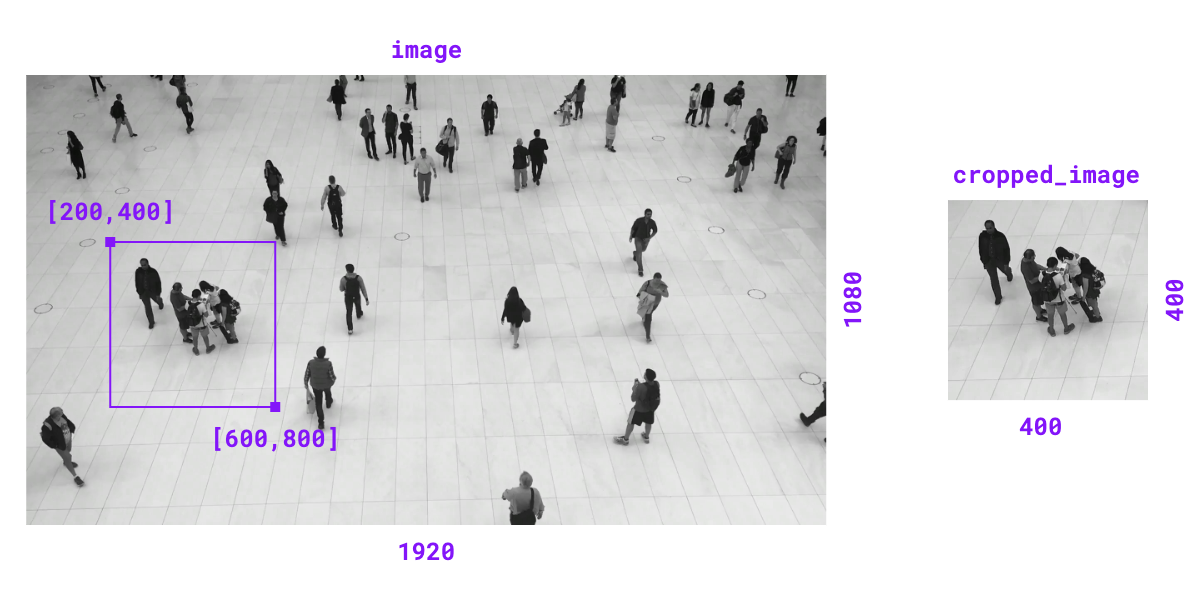
xyxy = [200, 400, 600, 800]
|
|
cropped_image = sv.crop_image(image=image, xyxy=xyxy)
|
|
cropped_image.shape
|
|
# (400, 400, 3)
|
|
```
|
|
|
|
=== "Pillow"
|
|
|
|
```python
|
|
from PIL import Image
|
|
import supervision as sv
|
|
|
|
image = Image.open(<SOURCE_IMAGE_PATH>)
|
|
image.size
|
|
# (1920, 1080)
|
|
|
|
xyxy = [200, 400, 600, 800]
|
|
cropped_image = sv.crop_image(image=image, xyxy=xyxy)
|
|
cropped_image.size
|
|
# (400, 400)
|
|
```
|
|
|
|
{ align=center width="800" }
|
|
""" # noqa E501 // docs
|
|
|
|
if isinstance(xyxy, (list, tuple)):
|
|
xyxy = np.array(xyxy)
|
|
xyxy = np.round(xyxy).astype(int)
|
|
x_min, y_min, x_max, y_max = xyxy.flatten()
|
|
return image[y_min:y_max, x_min:x_max]
|
|
|
|
|
|
@convert_for_image_processing
|
|
def scale_image(image: ImageType, scale_factor: float) -> ImageType:
|
|
"""
|
|
Scales the given image based on the given scale factor.
|
|
|
|
Args:
|
|
image (ImageType): The image to be scaled. `ImageType` is a flexible type,
|
|
accepting either `numpy.ndarray` or `PIL.Image.Image`.
|
|
scale_factor (float): The factor by which the image will be scaled. Scale
|
|
factor > `1.0` zooms in, < `1.0` zooms out.
|
|
|
|
Returns:
|
|
(ImageType): The scaled image. The type is determined by the input type and
|
|
may be either a `numpy.ndarray` or `PIL.Image.Image`.
|
|
|
|
Raises:
|
|
ValueError: If the scale factor is non-positive.
|
|
|
|
=== "OpenCV"
|
|
|
|
```python
|
|
import cv2
|
|
import supervision as sv
|
|
|
|
image = cv2.imread(<SOURCE_IMAGE_PATH>)
|
|
image.shape
|
|
# (1080, 1920, 3)
|
|
|
|
scaled_image = sv.scale_image(image=image, scale_factor=0.5)
|
|
scaled_image.shape
|
|
# (540, 960, 3)
|
|
```
|
|
|
|
=== "Pillow"
|
|
|
|
```python
|
|
from PIL import Image
|
|
import supervision as sv
|
|
|
|
image = Image.open(<SOURCE_IMAGE_PATH>)
|
|
image.size
|
|
# (1920, 1080)
|
|
|
|
scaled_image = sv.scale_image(image=image, scale_factor=0.5)
|
|
scaled_image.size
|
|
# (960, 540)
|
|
```
|
|
"""
|
|
if scale_factor <= 0:
|
|
raise ValueError("Scale factor must be positive.")
|
|
|
|
width_old, height_old = image.shape[1], image.shape[0]
|
|
width_new = int(width_old * scale_factor)
|
|
height_new = int(height_old * scale_factor)
|
|
return cv2.resize(image, (width_new, height_new), interpolation=cv2.INTER_LINEAR)
|
|
|
|
|
|
@convert_for_image_processing
|
|
def resize_image(
|
|
image: ImageType,
|
|
resolution_wh: Tuple[int, int],
|
|
keep_aspect_ratio: bool = False,
|
|
) -> ImageType:
|
|
"""
|
|
Resizes the given image to a specified resolution. Can maintain the original aspect
|
|
ratio or resize directly to the desired dimensions.
|
|
|
|
Args:
|
|
image (ImageType): The image to be resized. `ImageType` is a flexible type,
|
|
accepting either `numpy.ndarray` or `PIL.Image.Image`.
|
|
resolution_wh (Tuple[int, int]): The target resolution as
|
|
`(width, height)`.
|
|
keep_aspect_ratio (bool, optional): Flag to maintain the image's original
|
|
aspect ratio. Defaults to `False`.
|
|
|
|
Returns:
|
|
(ImageType): The resized image. The type is determined by the input type and
|
|
may be either a `numpy.ndarray` or `PIL.Image.Image`.
|
|
|
|
=== "OpenCV"
|
|
|
|
```python
|
|
import cv2
|
|
import supervision as sv
|
|
|
|
image = cv2.imread(<SOURCE_IMAGE_PATH>)
|
|
image.shape
|
|
# (1080, 1920, 3)
|
|
|
|
resized_image = sv.resize_image(
|
|
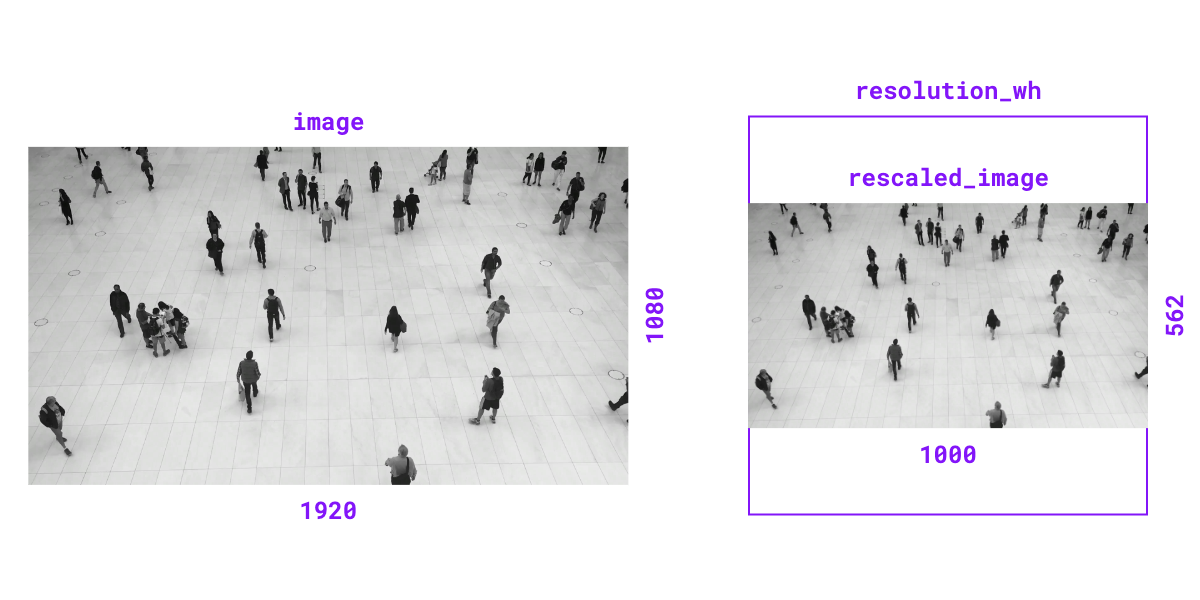
image=image, resolution_wh=(1000, 1000), keep_aspect_ratio=True
|
|
)
|
|
resized_image.shape
|
|
# (562, 1000, 3)
|
|
```
|
|
|
|
=== "Pillow"
|
|
|
|
```python
|
|
from PIL import Image
|
|
import supervision as sv
|
|
|
|
image = Image.open(<SOURCE_IMAGE_PATH>)
|
|
image.size
|
|
# (1920, 1080)
|
|
|
|
resized_image = sv.resize_image(
|
|
image=image, resolution_wh=(1000, 1000), keep_aspect_ratio=True
|
|
)
|
|
resized_image.size
|
|
# (1000, 562)
|
|
```
|
|
|
|
{ align=center width="800" }
|
|
""" # noqa E501 // docs
|
|
if keep_aspect_ratio:
|
|
image_ratio = image.shape[1] / image.shape[0]
|
|
target_ratio = resolution_wh[0] / resolution_wh[1]
|
|
if image_ratio >= target_ratio:
|
|
width_new = resolution_wh[0]
|
|
height_new = int(resolution_wh[0] / image_ratio)
|
|
else:
|
|
height_new = resolution_wh[1]
|
|
width_new = int(resolution_wh[1] * image_ratio)
|
|
else:
|
|
width_new, height_new = resolution_wh
|
|
|
|
return cv2.resize(image, (width_new, height_new), interpolation=cv2.INTER_LINEAR)
|
|
|
|
|
|
@convert_for_image_processing
|
|
def letterbox_image(
|
|
image: ImageType,
|
|
resolution_wh: Tuple[int, int],
|
|
color: Union[Tuple[int, int, int], Color] = Color.BLACK,
|
|
) -> ImageType:
|
|
"""
|
|
Resizes and pads an image to a specified resolution with a given color, maintaining
|
|
the original aspect ratio.
|
|
|
|
Args:
|
|
image (ImageType): The image to be resized. `ImageType` is a flexible type,
|
|
accepting either `numpy.ndarray` or `PIL.Image.Image`.
|
|
resolution_wh (Tuple[int, int]): The target resolution as
|
|
`(width, height)`.
|
|
color (Union[Tuple[int, int, int], Color]): The color to pad with. If tuple
|
|
provided it should be in BGR format.
|
|
|
|
Returns:
|
|
(ImageType): The resized image. The type is determined by the input type and
|
|
may be either a `numpy.ndarray` or `PIL.Image.Image`.
|
|
|
|
=== "OpenCV"
|
|
|
|
```python
|
|
import cv2
|
|
import supervision as sv
|
|
|
|
image = cv2.imread(<SOURCE_IMAGE_PATH>)
|
|
image.shape
|
|
# (1080, 1920, 3)
|
|
|
|
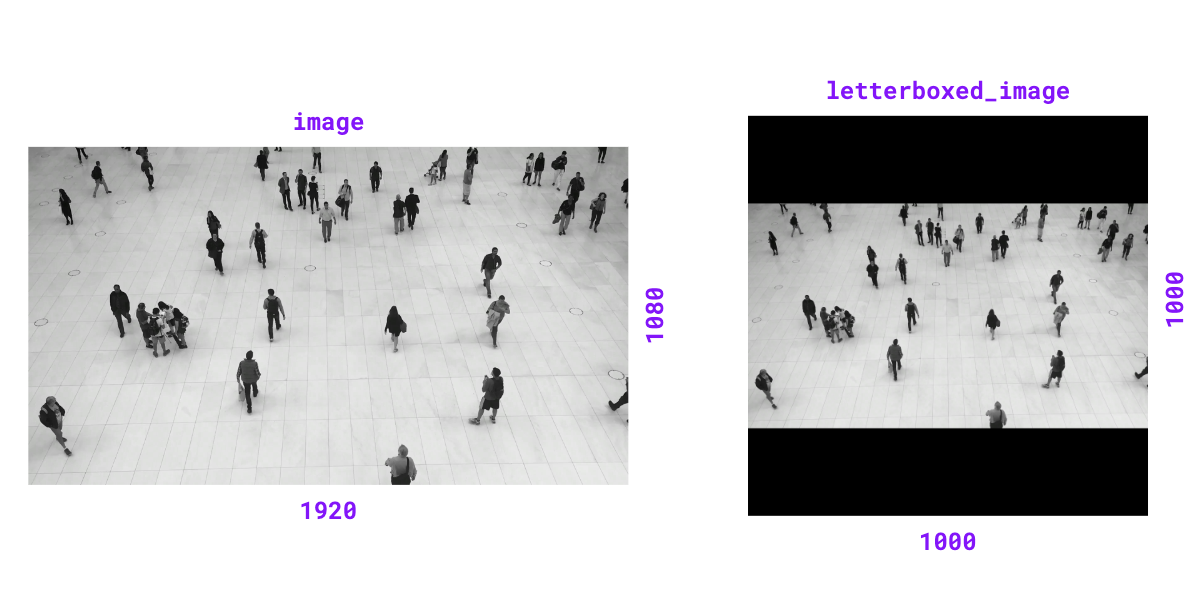
letterboxed_image = sv.letterbox_image(image=image, resolution_wh=(1000, 1000))
|
|
letterboxed_image.shape
|
|
# (1000, 1000, 3)
|
|
```
|
|
|
|
=== "Pillow"
|
|
|
|
```python
|
|
from PIL import Image
|
|
import supervision as sv
|
|
|
|
image = Image.open(<SOURCE_IMAGE_PATH>)
|
|
image.size
|
|
# (1920, 1080)
|
|
|
|
letterboxed_image = sv.letterbox_image(image=image, resolution_wh=(1000, 1000))
|
|
letterboxed_image.size
|
|
# (1000, 1000)
|
|
```
|
|
|
|
{ align=center width="800" }
|
|
""" # noqa E501 // docs
|
|
color = unify_to_bgr(color=color)
|
|
resized_image = resize_image(
|
|
image=image, resolution_wh=resolution_wh, keep_aspect_ratio=True
|
|
)
|
|
height_new, width_new = resized_image.shape[:2]
|
|
padding_top = (resolution_wh[1] - height_new) // 2
|
|
padding_bottom = resolution_wh[1] - height_new - padding_top
|
|
padding_left = (resolution_wh[0] - width_new) // 2
|
|
padding_right = resolution_wh[0] - width_new - padding_left
|
|
return cv2.copyMakeBorder(
|
|
resized_image,
|
|
padding_top,
|
|
padding_bottom,
|
|
padding_left,
|
|
padding_right,
|
|
cv2.BORDER_CONSTANT,
|
|
value=color,
|
|
)
|
|
|
|
|
|
def overlay_image(
|
|
image: npt.NDArray[np.uint8],
|
|
overlay: npt.NDArray[np.uint8],
|
|
anchor: Tuple[int, int],
|
|
) -> npt.NDArray[np.uint8]:
|
|
"""
|
|
Places an image onto a scene at a given anchor point, handling cases where
|
|
the image's position is partially or completely outside the scene's bounds.
|
|
|
|
Args:
|
|
image (np.ndarray): The background scene onto which the image is placed.
|
|
overlay (np.ndarray): The image to be placed onto the scene.
|
|
anchor (Tuple[int, int]): The `(x, y)` coordinates in the scene where the
|
|
top-left corner of the image will be placed.
|
|
|
|
Returns:
|
|
(np.ndarray): The result image with overlay.
|
|
|
|
Examples:
|
|
```python
|
|
import cv2
|
|
import numpy as np
|
|
import supervision as sv
|
|
|
|
image = cv2.imread(<SOURCE_IMAGE_PATH>)
|
|
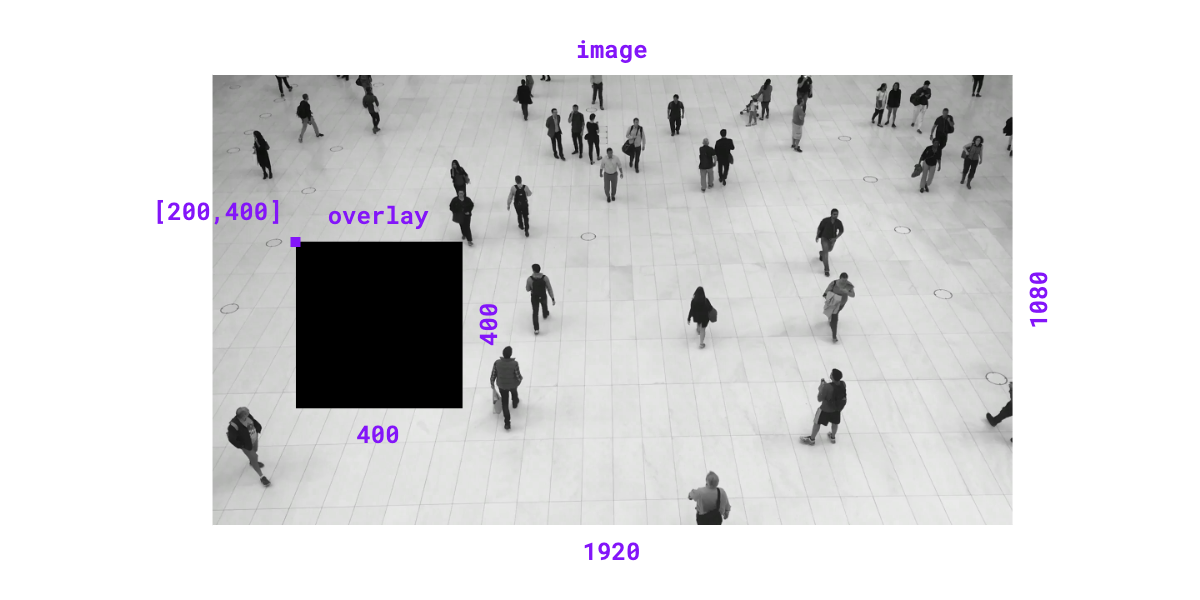
overlay = np.zeros((400, 400, 3), dtype=np.uint8)
|
|
result_image = sv.overlay_image(image=image, overlay=overlay, anchor=(200, 400))
|
|
```
|
|
|
|
{ align=center width="800" }
|
|
""" # noqa E501 // docs
|
|
scene_height, scene_width = image.shape[:2]
|
|
image_height, image_width = overlay.shape[:2]
|
|
anchor_x, anchor_y = anchor
|
|
|
|
is_out_horizontally = anchor_x + image_width <= 0 or anchor_x >= scene_width
|
|
is_out_vertically = anchor_y + image_height <= 0 or anchor_y >= scene_height
|
|
|
|
if is_out_horizontally or is_out_vertically:
|
|
return image
|
|
|
|
x_min = max(anchor_x, 0)
|
|
y_min = max(anchor_y, 0)
|
|
x_max = min(scene_width, anchor_x + image_width)
|
|
y_max = min(scene_height, anchor_y + image_height)
|
|
|
|
crop_x_min = max(-anchor_x, 0)
|
|
crop_y_min = max(-anchor_y, 0)
|
|
crop_x_max = image_width - max((anchor_x + image_width) - scene_width, 0)
|
|
crop_y_max = image_height - max((anchor_y + image_height) - scene_height, 0)
|
|
|
|
image[y_min:y_max, x_min:x_max] = overlay[
|
|
crop_y_min:crop_y_max, crop_x_min:crop_x_max
|
|
]
|
|
|
|
return image
|
|
|
|
|
|
class ImageSink:
|
|
def __init__(
|
|
self,
|
|
target_dir_path: str,
|
|
overwrite: bool = False,
|
|
image_name_pattern: str = "image_{:05d}.png",
|
|
):
|
|
"""
|
|
Initialize a context manager for saving images.
|
|
|
|
Args:
|
|
target_dir_path (str): The target directory where images will be saved.
|
|
overwrite (bool, optional): Whether to overwrite the existing directory.
|
|
Defaults to False.
|
|
image_name_pattern (str, optional): The image file name pattern.
|
|
Defaults to "image_{:05d}.png".
|
|
|
|
Examples:
|
|
```python
|
|
import supervision as sv
|
|
|
|
frames_generator = sv.get_video_frames_generator(<SOURCE_VIDEO_PATH>, stride=2)
|
|
|
|
with sv.ImageSink(target_dir_path=<TARGET_CROPS_DIRECTORY>) as sink:
|
|
for image in frames_generator:
|
|
sink.save_image(image=image)
|
|
```
|
|
""" # noqa E501 // docs
|
|
|
|
self.target_dir_path = target_dir_path
|
|
self.overwrite = overwrite
|
|
self.image_name_pattern = image_name_pattern
|
|
self.image_count = 0
|
|
|
|
def __enter__(self):
|
|
if os.path.exists(self.target_dir_path):
|
|
if self.overwrite:
|
|
shutil.rmtree(self.target_dir_path)
|
|
os.makedirs(self.target_dir_path)
|
|
else:
|
|
os.makedirs(self.target_dir_path)
|
|
|
|
return self
|
|
|
|
def save_image(self, image: np.ndarray, image_name: Optional[str] = None):
|
|
"""
|
|
Save a given image in the target directory.
|
|
|
|
Args:
|
|
image (np.ndarray): The image to be saved. The image must be in BGR color
|
|
format.
|
|
image_name (str, optional): The name to use for the saved image.
|
|
If not provided, a name will be
|
|
generated using the `image_name_pattern`.
|
|
"""
|
|
if image_name is None:
|
|
image_name = self.image_name_pattern.format(self.image_count)
|
|
|
|
image_path = os.path.join(self.target_dir_path, image_name)
|
|
cv2.imwrite(image_path, image)
|
|
self.image_count += 1
|
|
|
|
def __exit__(self, exc_type, exc_value, exc_traceback):
|
|
pass
|
|
|
|
|
|
def create_tiles(
|
|
images: List[ImageType],
|
|
grid_size: Optional[Tuple[Optional[int], Optional[int]]] = None,
|
|
single_tile_size: Optional[Tuple[int, int]] = None,
|
|
tile_scaling: Literal["min", "max", "avg"] = "avg",
|
|
tile_padding_color: Union[Tuple[int, int, int], Color] = Color.from_hex("#D9D9D9"),
|
|
tile_margin: int = 10,
|
|
tile_margin_color: Union[Tuple[int, int, int], Color] = Color.from_hex("#BFBEBD"),
|
|
return_type: Literal["auto", "cv2", "pillow"] = "auto",
|
|
titles: Optional[List[Optional[str]]] = None,
|
|
titles_anchors: Optional[Union[Point, List[Optional[Point]]]] = None,
|
|
titles_color: Union[Tuple[int, int, int], Color] = Color.from_hex("#262523"),
|
|
titles_scale: Optional[float] = None,
|
|
titles_thickness: int = 1,
|
|
titles_padding: int = 10,
|
|
titles_text_font: int = cv2.FONT_HERSHEY_SIMPLEX,
|
|
titles_background_color: Union[Tuple[int, int, int], Color] = Color.from_hex(
|
|
"#D9D9D9"
|
|
),
|
|
default_title_placement: RelativePosition = "top",
|
|
) -> ImageType:
|
|
"""
|
|
Creates tiles mosaic from input images, automating grid placement and
|
|
converting images to common resolution maintaining aspect ratio. It is
|
|
also possible to render text titles on tiles, using optional set of
|
|
parameters specifying text drawing (see parameters description).
|
|
|
|
Automated grid placement will try to maintain square shape of grid
|
|
(with size being the nearest integer square root of #images), up to two exceptions:
|
|
* if there are up to 3 images - images will be displayed in single row
|
|
* if square-grid placement causes last row to be empty - number of rows is trimmed
|
|
until last row has at least one image
|
|
|
|
Args:
|
|
images (List[ImageType]): Images to create tiles. Elements can be either
|
|
np.ndarray or PIL.Image, common representation will be agreed by the
|
|
function.
|
|
grid_size (Optional[Tuple[Optional[int], Optional[int]]]): Expected grid
|
|
size in format (n_rows, n_cols). If not given - automated grid placement
|
|
will be applied. One may also provide only one out of two elements of the
|
|
tuple - then grid will be created with either n_rows or n_cols fixed,
|
|
leaving the other dimension to be adjusted by the number of images
|
|
single_tile_size (Optional[Tuple[int, int]]): sizeof a single tile element
|
|
provided in (width, height) format. If not given - size of tile will be
|
|
automatically calculated based on `tile_scaling` parameter.
|
|
tile_scaling (Literal["min", "max", "avg"]): If `single_tile_size` is not
|
|
given - parameter will be used to calculate tile size - using
|
|
min / max / avg size of image provided in `images` list.
|
|
tile_padding_color (Union[Tuple[int, int, int], sv.Color]): Color to be used in
|
|
images letterbox procedure (while standardising tiles sizes) as a padding.
|
|
If tuple provided - should be BGR.
|
|
tile_margin (int): size of margin between tiles (in pixels)
|
|
tile_margin_color (Union[Tuple[int, int, int], sv.Color]): Color of tile margin.
|
|
If tuple provided - should be BGR.
|
|
return_type (Literal["auto", "cv2", "pillow"]): Parameter dictates the format of
|
|
return image. One may choose specific type ("cv2" or "pillow") to enforce
|
|
conversion. "auto" mode takes a majority vote between types of elements in
|
|
`images` list - resolving draws in favour of OpenCV format. "auto" can be
|
|
safely used when all input images are of the same type.
|
|
titles (Optional[List[Optional[str]]]): Optional titles to be added to tiles.
|
|
Elements of that list may be empty - then specific tile (in order presented
|
|
in `images` parameter) will not be filled with title. It is possible to
|
|
provide list of titles shorter than `images` - then remaining titles will
|
|
be assumed empty.
|
|
titles_anchors (Optional[Union[Point, List[Optional[Point]]]]): Parameter to
|
|
specify anchor points for titles. It is possible to specify anchor either
|
|
globally or for specific tiles (following order of `images`).
|
|
If not given (either globally, or for specific element of the list),
|
|
it will be calculated automatically based on `default_title_placement`.
|
|
titles_color (Union[Tuple[int, int, int], Color]): Color of titles text.
|
|
If tuple provided - should be BGR.
|
|
titles_scale (Optional[float]): Scale of titles. If not provided - value will
|
|
be calculated using `calculate_optimal_text_scale(...)`.
|
|
titles_thickness (int): Thickness of titles text.
|
|
titles_padding (int): Size of titles padding.
|
|
titles_text_font (int): Font to be used to render titles. Must be integer
|
|
constant representing OpenCV font.
|
|
(See docs: https://docs.opencv.org/4.x/d6/d6e/group__imgproc__draw.html)
|
|
titles_background_color (Union[Tuple[int, int, int], Color]): Color of title
|
|
text padding.
|
|
default_title_placement (Literal["top", "bottom"]): Parameter specifies title
|
|
anchor placement in case if explicit anchor is not provided.
|
|
|
|
Returns:
|
|
ImageType: Image with all input images located in tails grid. The output type is
|
|
determined by `return_type` parameter.
|
|
|
|
Raises:
|
|
ValueError: In case when input images list is empty, provided `grid_size` is too
|
|
small to fit all images, `tile_scaling` mode is invalid.
|
|
"""
|
|
if len(images) == 0:
|
|
raise ValueError("Could not create image tiles from empty list of images.")
|
|
if return_type == "auto":
|
|
return_type = _negotiate_tiles_format(images=images)
|
|
tile_padding_color = unify_to_bgr(color=tile_padding_color)
|
|
tile_margin_color = unify_to_bgr(color=tile_margin_color)
|
|
images = images_to_cv2(images=images)
|
|
if single_tile_size is None:
|
|
single_tile_size = _aggregate_images_shape(images=images, mode=tile_scaling)
|
|
resized_images = [
|
|
letterbox_image(
|
|
image=i, resolution_wh=single_tile_size, color=tile_padding_color
|
|
)
|
|
for i in images
|
|
]
|
|
grid_size = _establish_grid_size(images=images, grid_size=grid_size)
|
|
if len(images) > grid_size[0] * grid_size[1]:
|
|
raise ValueError(
|
|
f"Could not place {len(images)} in grid with size: {grid_size}."
|
|
)
|
|
if titles is not None:
|
|
titles = fill(sequence=titles, desired_size=len(images), content=None)
|
|
titles_anchors = (
|
|
[titles_anchors]
|
|
if not issubclass(type(titles_anchors), list)
|
|
else titles_anchors
|
|
)
|
|
titles_anchors = fill(
|
|
sequence=titles_anchors, desired_size=len(images), content=None
|
|
)
|
|
titles_color = unify_to_bgr(color=titles_color)
|
|
titles_background_color = unify_to_bgr(color=titles_background_color)
|
|
tiles = _generate_tiles(
|
|
images=resized_images,
|
|
grid_size=grid_size,
|
|
single_tile_size=single_tile_size,
|
|
tile_padding_color=tile_padding_color,
|
|
tile_margin=tile_margin,
|
|
tile_margin_color=tile_margin_color,
|
|
titles=titles,
|
|
titles_anchors=titles_anchors,
|
|
titles_color=titles_color,
|
|
titles_scale=titles_scale,
|
|
titles_thickness=titles_thickness,
|
|
titles_padding=titles_padding,
|
|
titles_text_font=titles_text_font,
|
|
titles_background_color=titles_background_color,
|
|
default_title_placement=default_title_placement,
|
|
)
|
|
if return_type == "pillow":
|
|
tiles = cv2_to_pillow(image=tiles)
|
|
return tiles
|
|
|
|
|
|
def _negotiate_tiles_format(images: List[ImageType]) -> Literal["cv2", "pillow"]:
|
|
number_of_np_arrays = sum(issubclass(type(i), np.ndarray) for i in images)
|
|
if number_of_np_arrays >= (len(images) // 2):
|
|
return "cv2"
|
|
return "pillow"
|
|
|
|
|
|
def _calculate_aggregated_images_shape(
|
|
images: List[np.ndarray], aggregator: Callable[[List[int]], float]
|
|
) -> Tuple[int, int]:
|
|
height = round(aggregator([i.shape[0] for i in images]))
|
|
width = round(aggregator([i.shape[1] for i in images]))
|
|
return width, height
|
|
|
|
|
|
SHAPE_AGGREGATION_FUN = {
|
|
"min": partial(_calculate_aggregated_images_shape, aggregator=np.min),
|
|
"max": partial(_calculate_aggregated_images_shape, aggregator=np.max),
|
|
"avg": partial(_calculate_aggregated_images_shape, aggregator=np.average),
|
|
}
|
|
|
|
|
|
def _aggregate_images_shape(
|
|
images: List[np.ndarray], mode: Literal["min", "max", "avg"]
|
|
) -> Tuple[int, int]:
|
|
if mode not in SHAPE_AGGREGATION_FUN:
|
|
raise ValueError(
|
|
f"Could not aggregate images shape - provided unknown mode: {mode}. "
|
|
f"Supported modes: {list(SHAPE_AGGREGATION_FUN.keys())}."
|
|
)
|
|
return SHAPE_AGGREGATION_FUN[mode](images)
|
|
|
|
|
|
def _establish_grid_size(
|
|
images: List[np.ndarray], grid_size: Optional[Tuple[Optional[int], Optional[int]]]
|
|
) -> Tuple[int, int]:
|
|
if grid_size is None or all(e is None for e in grid_size):
|
|
return _negotiate_grid_size(images=images)
|
|
if grid_size[0] is None:
|
|
return math.ceil(len(images) / grid_size[1]), grid_size[1]
|
|
if grid_size[1] is None:
|
|
return grid_size[0], math.ceil(len(images) / grid_size[0])
|
|
return grid_size
|
|
|
|
|
|
def _negotiate_grid_size(images: List[np.ndarray]) -> Tuple[int, int]:
|
|
if len(images) <= MAX_COLUMNS_FOR_SINGLE_ROW_GRID:
|
|
return 1, len(images)
|
|
nearest_sqrt = math.ceil(np.sqrt(len(images)))
|
|
proposed_columns = nearest_sqrt
|
|
proposed_rows = nearest_sqrt
|
|
while proposed_columns * (proposed_rows - 1) >= len(images):
|
|
proposed_rows -= 1
|
|
return proposed_rows, proposed_columns
|
|
|
|
|
|
def _generate_tiles(
|
|
images: List[np.ndarray],
|
|
grid_size: Tuple[int, int],
|
|
single_tile_size: Tuple[int, int],
|
|
tile_padding_color: Tuple[int, int, int],
|
|
tile_margin: int,
|
|
tile_margin_color: Tuple[int, int, int],
|
|
titles: Optional[List[Optional[str]]],
|
|
titles_anchors: List[Optional[Point]],
|
|
titles_color: Tuple[int, int, int],
|
|
titles_scale: Optional[float],
|
|
titles_thickness: int,
|
|
titles_padding: int,
|
|
titles_text_font: int,
|
|
titles_background_color: Tuple[int, int, int],
|
|
default_title_placement: RelativePosition,
|
|
) -> np.ndarray:
|
|
images = _draw_texts(
|
|
images=images,
|
|
titles=titles,
|
|
titles_anchors=titles_anchors,
|
|
titles_color=titles_color,
|
|
titles_scale=titles_scale,
|
|
titles_thickness=titles_thickness,
|
|
titles_padding=titles_padding,
|
|
titles_text_font=titles_text_font,
|
|
titles_background_color=titles_background_color,
|
|
default_title_placement=default_title_placement,
|
|
)
|
|
rows, columns = grid_size
|
|
tiles_elements = list(create_batches(sequence=images, batch_size=columns))
|
|
while len(tiles_elements[-1]) < columns:
|
|
tiles_elements[-1].append(
|
|
_generate_color_image(shape=single_tile_size, color=tile_padding_color)
|
|
)
|
|
while len(tiles_elements) < rows:
|
|
tiles_elements.append(
|
|
[_generate_color_image(shape=single_tile_size, color=tile_padding_color)]
|
|
* columns
|
|
)
|
|
return _merge_tiles_elements(
|
|
tiles_elements=tiles_elements,
|
|
grid_size=grid_size,
|
|
single_tile_size=single_tile_size,
|
|
tile_margin=tile_margin,
|
|
tile_margin_color=tile_margin_color,
|
|
)
|
|
|
|
|
|
def _draw_texts(
|
|
images: List[np.ndarray],
|
|
titles: Optional[List[Optional[str]]],
|
|
titles_anchors: List[Optional[Point]],
|
|
titles_color: Tuple[int, int, int],
|
|
titles_scale: Optional[float],
|
|
titles_thickness: int,
|
|
titles_padding: int,
|
|
titles_text_font: int,
|
|
titles_background_color: Tuple[int, int, int],
|
|
default_title_placement: RelativePosition,
|
|
) -> List[np.ndarray]:
|
|
if titles is None:
|
|
return images
|
|
titles_anchors = _prepare_default_titles_anchors(
|
|
images=images,
|
|
titles_anchors=titles_anchors,
|
|
default_title_placement=default_title_placement,
|
|
)
|
|
if titles_scale is None:
|
|
image_height, image_width = images[0].shape[:2]
|
|
titles_scale = calculate_optimal_text_scale(
|
|
resolution_wh=(image_width, image_height)
|
|
)
|
|
result = []
|
|
for image, text, anchor in zip(images, titles, titles_anchors):
|
|
if text is None:
|
|
result.append(image)
|
|
continue
|
|
processed_image = draw_text(
|
|
scene=image,
|
|
text=text,
|
|
text_anchor=anchor,
|
|
text_color=Color.from_bgr_tuple(titles_color),
|
|
text_scale=titles_scale,
|
|
text_thickness=titles_thickness,
|
|
text_padding=titles_padding,
|
|
text_font=titles_text_font,
|
|
background_color=Color.from_bgr_tuple(titles_background_color),
|
|
)
|
|
result.append(processed_image)
|
|
return result
|
|
|
|
|
|
def _prepare_default_titles_anchors(
|
|
images: List[np.ndarray],
|
|
titles_anchors: List[Optional[Point]],
|
|
default_title_placement: RelativePosition,
|
|
) -> List[Point]:
|
|
result = []
|
|
for image, anchor in zip(images, titles_anchors):
|
|
if anchor is not None:
|
|
result.append(anchor)
|
|
continue
|
|
image_height, image_width = image.shape[:2]
|
|
if default_title_placement == "top":
|
|
default_anchor = Point(x=image_width / 2, y=image_height * 0.1)
|
|
else:
|
|
default_anchor = Point(x=image_width / 2, y=image_height * 0.9)
|
|
result.append(default_anchor)
|
|
return result
|
|
|
|
|
|
def _merge_tiles_elements(
|
|
tiles_elements: List[List[np.ndarray]],
|
|
grid_size: Tuple[int, int],
|
|
single_tile_size: Tuple[int, int],
|
|
tile_margin: int,
|
|
tile_margin_color: Tuple[int, int, int],
|
|
) -> np.ndarray:
|
|
vertical_padding = (
|
|
np.ones((single_tile_size[1], tile_margin, 3)) * tile_margin_color
|
|
)
|
|
merged_rows = [
|
|
np.concatenate(
|
|
list(
|
|
itertools.chain.from_iterable(
|
|
zip(row, [vertical_padding] * grid_size[1])
|
|
)
|
|
)[:-1],
|
|
axis=1,
|
|
)
|
|
for row in tiles_elements
|
|
]
|
|
row_width = merged_rows[0].shape[1]
|
|
horizontal_padding = (
|
|
np.ones((tile_margin, row_width, 3), dtype=np.uint8) * tile_margin_color
|
|
)
|
|
rows_with_paddings = []
|
|
for row in merged_rows:
|
|
rows_with_paddings.append(row)
|
|
rows_with_paddings.append(horizontal_padding)
|
|
return np.concatenate(
|
|
rows_with_paddings[:-1],
|
|
axis=0,
|
|
).astype(np.uint8)
|
|
|
|
|
|
def _generate_color_image(
|
|
shape: Tuple[int, int], color: Tuple[int, int, int]
|
|
) -> np.ndarray:
|
|
return np.ones(shape[::-1] + (3,), dtype=np.uint8) * color
|