
15 KiB

yutu












yutu 是一个 YouTube CLI、MCP 服务器和 AI Agent,可以自动化您的整个 YouTube 工作流程——从上传和优化视频到管理评论、播放列表和频道品牌——帮助您获得更多播放量、更高的点击率和更强的观众互动,同时大幅减少手动操作。
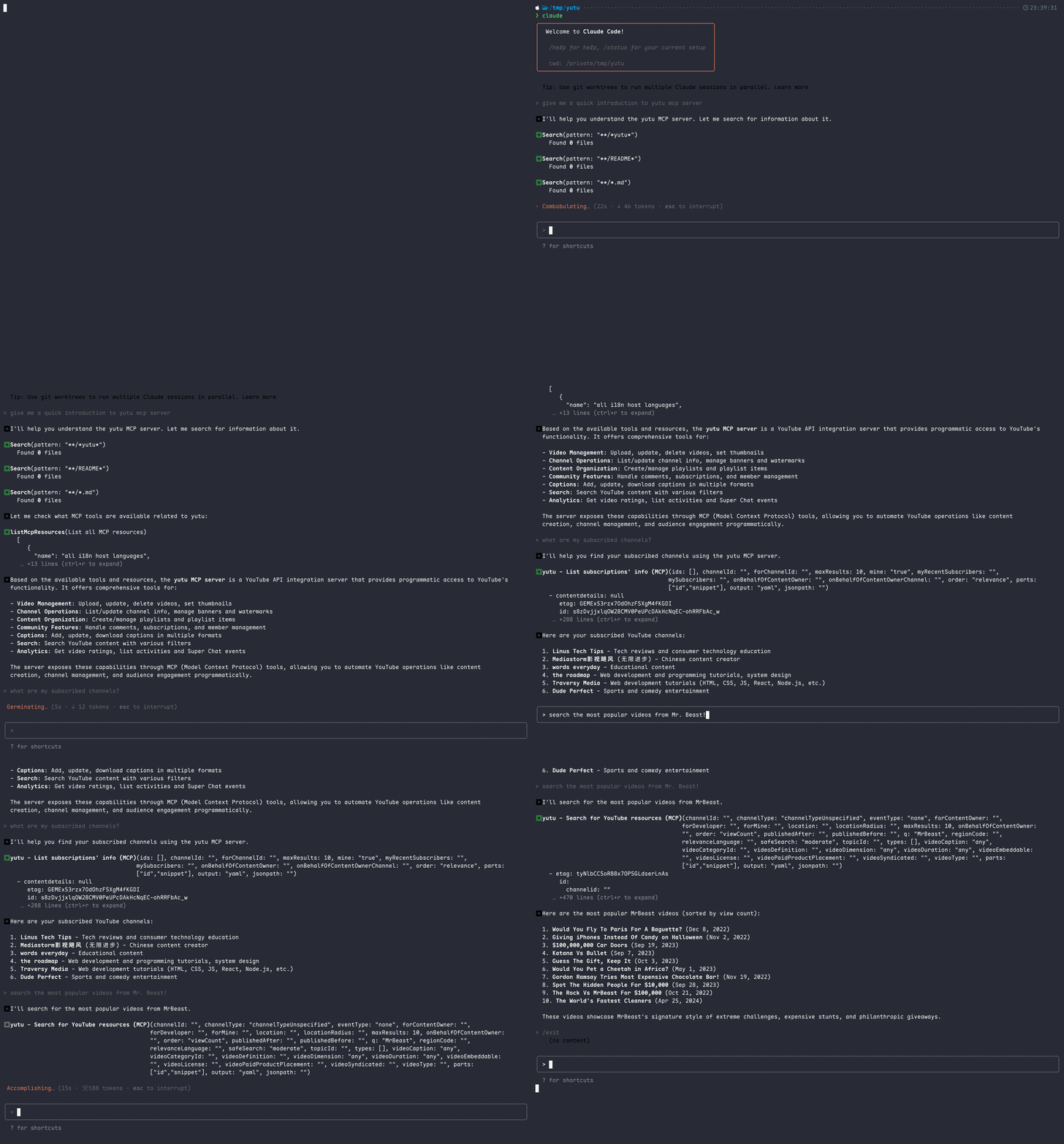
目录
前提条件
开始之前,您需要在 Google Cloud Platform 上创建一个账户来新建项目,并为该项目启用以下 API,位置在 APIs & Services -> Enable APIs and services -> + ENABLE APIS AND SERVICES:
启用 API 后,创建一个 OAuth content screen,将您自己设置为测试用户,然后创建一个类型为 Desktop app 的 OAuth Client ID。
将此凭据下载到本地机器,命名为 client_secret.json,它应该看起来像这样:
{
  "installed": {
    "client_id": "11181119.apps.googleusercontent.com",
    "project_id": "yutu-11181119",
    "auth_uri": "https://accounts.google.com/o/oauth2/auth",
    "token_uri": "https://oauth2.googleapis.com/token",
    "auth_provider_x509_cert_url": "https://www.googleapis.com/oauth2/v1/certs",
    "client_secret": "XXXXXXXXXXXXXXXX",
    "redirect_uris": [
      "http://localhost"
    ]
  }
}
要验证此凭据,请运行以下命令:
❯ yutu auth --credential client_secret.json
浏览器窗口将打开,要求您授权访问您的 YouTube 账户。授权后,将生成一个令牌并保存到 youtube.token.json。
{
  "access_token": "ya29.XXXXXXXXX",
  "token_type":"Bearer",
  "refresh_token":"1//XXXXXXXXXX",
  "expiry": "2024-05-26T18:49:56.1911165+08:00",
  "expires_in": 3599
}
默认情况下,yutu 将从当前目录读取 client_secret.json 和 youtube.token.json,--credential/-c 和 --cacheToken/-t 标志仅在 auth 子命令中可用。要在所有子命令中修改默认路径,请设置这些环境变量:
❯ export YUTU_CREDENTIAL=client_secret.json
❯ export YUTU_CACHE_TOKEN=youtube.token.json
# 或
❯ YUTU_CREDENTIAL=client_secret.json YUTU_CACHE_TOKEN=youtube.token.json yutu subcommand --flag value
全局环境变量
| 变量 | 描述 | 默认值 |
|---|---|---|
YUTU_CREDENTIAL |
OAuth 客户端密钥的路径、Base64 或 JSON | client_secret.json |
YUTU_CACHE_TOKEN |
缓存的 OAuth 令牌的路径、Base64 或 JSON | youtube.token.json |
YUTU_ROOT |
文件解析的根目录 | 当前工作目录 |
YUTU_LOG_LEVEL |
日志级别:DEBUG、INFO、WARN、ERROR |
INFO |
安装
如果您正在使用 AI Agent,可以复制以下提示词来完成安装:
Install and configure yutu by following https://raw.githubusercontent.com/eat-pray-ai/yutu/refs/heads/main/internal/tools/skillgen/setup.md
您可以直接从发布页面下载 yutu,或使用以下您喜欢的方法。
GitHub Actions
yutu 有两个可用的 GitHub Action,一个是通用 action,另一个专用于上传视频到 YouTube。更多信息请参考 youtube-action 和 youtube-uploader。
Node.js
❯ npm i -g @eat-pray-ai/yutu
Docker
❯ docker pull ghcr.io/eat-pray-ai/yutu:latest
❯ docker run --rm ghcr.io/eat-pray-ai/yutu:latest
# 确保 client_secret.json 在当前目录中
❯ docker run --rm -it -u $(id -u):$(id -g) -v $(pwd):/app -p 8216:8216 ghcr.io/eat-pray-ai/yutu:latest
Gopher
❯ go install github.com/eat-pray-ai/yutu@latest
Linux
❯ curl -sSfL https://raw.githubusercontent.com/eat-pray-ai/yutu/main/scripts/install.sh | bash
macOS
使用 Homebrew🍺 安装 yutu(推荐),或运行 shell 脚本。
❯ brew install yutu

# 或
❯ curl -sSfL https://raw.githubusercontent.com/eat-pray-ai/yutu/main/scripts/install.sh | bash
Windows
❯ winget install yutu
验证安装
使用其关联的加密签名证明来验证 yutu 的完整性和来源。
# Docker
❯ gh attestation verify oci://ghcr.io/eat-pray-ai/yutu:latest --repo eat-pray-ai/yutu

# Linux 和 macOS(如果使用 shell 脚本安装)
❯ gh attestation verify $(which yutu) --repo eat-pray-ai/yutu

# Windows
❯ gh attestation verify $(where.exe yutu.exe) --repo eat-pray-ai/yutu
Agent
yutu 提供了 Agent 模式(Miffy)来自动化 YouTube 工作流程。该 Agent 可以检索、创建、更新和删除 YouTube 内容,内置 YouTube 增长策略和 SEO 专业知识。
目前,Agent 模式仍在积极开发中,仅支持 Google 的 Gemini 模型。
# 控制台模式(默认)
❯ yutu agent --api-key "YOUR_GEMINI_API_KEY"
# 指定不同的模型
❯ yutu agent --model "google:gemini-3.7-flash" --api-key "YOUR_GEMINI_API_KEY"
# Web 模式
❯ yutu agent --args "web api a2a webui" --api-key "YOUR_GEMINI_API_KEY"
# 查看可用的启动参数
❯ yutu agent --args ""
Agent 参数
| 参数 | 描述 | 默认值 |
|---|---|---|
-a, --args |
启动参数(单个字符串) | console |
-m, --model |
模型(provider:modelName 格式) |
google:gemini-3.7-flash |
--api-key |
模型提供商的 API 密钥 | |
-i, --instruction |
覆盖内置的 Agent 指令 | INSTRUCTION.md |
可选设置环境变量 GOOGLE_GEMINI_BASE_URL 来使用自定义的 Gemini API 地址。
MCP 服务器
在将 yutu 用作 MCP 服务器之前,请确保已安装 yutu(参见安装部分),并且您有有效的 client_secret.json 和 youtube.token.json 文件(参考前提条件部分)。
您可以通过点击下方徽章将 yutu 添加为 VS Code 或 Cursor 中的 MCP 服务器,或使用下面的 CLI 命令。


Claude Code
# Stdio 模式
❯ claude mcp add -e YUTU_CREDENTIAL=/absolute/path/to/client_secret.json \
  -e YUTU_CACHE_TOKEN=/absolute/path/to/youtube.token.json \
  yutu -- yutu mcp

# HTTP 模式(先启动服务器:yutu mcp --mode http --auth)
❯ claude mcp add --transport http \
  --client-id YOUR_CLIENT_ID.apps.googleusercontent.com \
  --client-secret \
  yutu http://localhost:8216/mcp
Codex
# Stdio 模式
❯ codex mcp add --env YUTU_CREDENTIAL=/absolute/path/to/client_secret.json \
  --env YUTU_CACHE_TOKEN=/absolute/path/to/youtube.token.json \
  yutu -- yutu mcp

# HTTP 模式(先启动服务器:yutu mcp --mode http --auth)
❯ codex mcp add --url http://localhost:8216/mcp \
  --oauth-client-id YOUR_CLIENT_ID.apps.googleusercontent.com \
  yutu
手动配置(VS Code、Cursor、OpenCode 等)
将以下配置添加到您的 MCP 设置中。记得将 YUTU_CREDENTIAL 和 YUTU_CACHE_TOKEN 的值替换为您本地机器上的正确路径。
{
  "yutu": {
    "type": "stdio",
    "command": "yutu",
    "args": [
      "mcp"
    ],
    "env": {
      "YUTU_CREDENTIAL": "/absolute/path/to/client_secret.json",
      "YUTU_CACHE_TOKEN": "/absolute/path/to/youtube.token.json"
    }
  }
}
Skills
yutu 提供了一个统一的 skill,为 AI Agent 扩展 YouTube 领域知识、常用工作流和 SEO 最佳实践——涵盖视频、播放列表、评论、频道、字幕、订阅等。
❯ npx skills add https://github.com/eat-pray-ai/yutu/tree/main/skills/youtube
完整的支持操作列表请参见 skills/youtube/SKILL.md。
使用方法
❯ yutu
yutu is a CLI, MCP server, and AI agent for YouTube that can automate almost all YouTube workflows.

Environment variables:
  YUTU_CREDENTIAL    Path/Base64/JSON of OAuth client secret (default: client_secret.json)
  YUTU_CACHE_TOKEN   Path/Base64/JSON of cached OAuth token (default: youtube.token.json)
  YUTU_ROOT          Root directory for file resolution (default: current working directory)
  YUTU_LOG_LEVEL     Log level: DEBUG, INFO, WARN, ERROR (default: INFO)

Usage:
  yutu [flags]
  yutu [command]

Available Commands:
  abuseReport            Manage YouTube abuse reports
  activity               Manage activities on YouTube
  agent                  Start an agent to automate YouTube workflows
  auth                   Authenticate with YouTube APIs
  caption                Manage YouTube video captions
  channel                Manage YouTube channels
  channelBanner          Manage YouTube channel banners
  channelSection         Manage YouTube channel sections
  comment                Manage YouTube comments
  commentThread          Manage YouTube comment threads
  completion             Generate the autocompletion script for the specified shell
  help                   Help about any command
  i18nLanguage           Manage YouTube i18n languages
  i18nRegion             Manage YouTube i18n regions
  liveBroadcast          Manage YouTube live broadcasts
  liveChatBan            Manage YouTube live chat bans
  liveChatMessage        Manage YouTube live chat messages
  liveChatModerator      Manage YouTube live chat moderators
  liveStream             Manage YouTube live streams
  mcp                    Start MCP server
  member                 Manage YouTube channel members
  membershipsLevel       Manage YouTube memberships levels
  playlist               Manage YouTube playlists
  playlistImage          Manage YouTube playlist images
  playlistItem           Manage YouTube playlist items
  search                 Manage YouTube search
  subscription           Manage YouTube subscriptions
  superChatEvent         Manage YouTube Super Chat events
  thirdPartyLink         Manage YouTube third-party links
  thumbnail              Manage YouTube video thumbnails
  version                Show the version of yutu
  video                  Manage YouTube videos
  videoAbuseReportReason Manage YouTube video abuse report reasons
  videoCategory          Manage YouTube video categories
  watermark              Manage YouTube watermarks

Flags:
  -h, --help   help for yutu

Use "yutu [command] --help" for more information about a command.
功能特性
请参考 FEATURES.md 获取更多信息。
贡献
请参考 CONTRIBUTING.md 获取更多信息。