
Caption Translator


# What is Caption Trans?
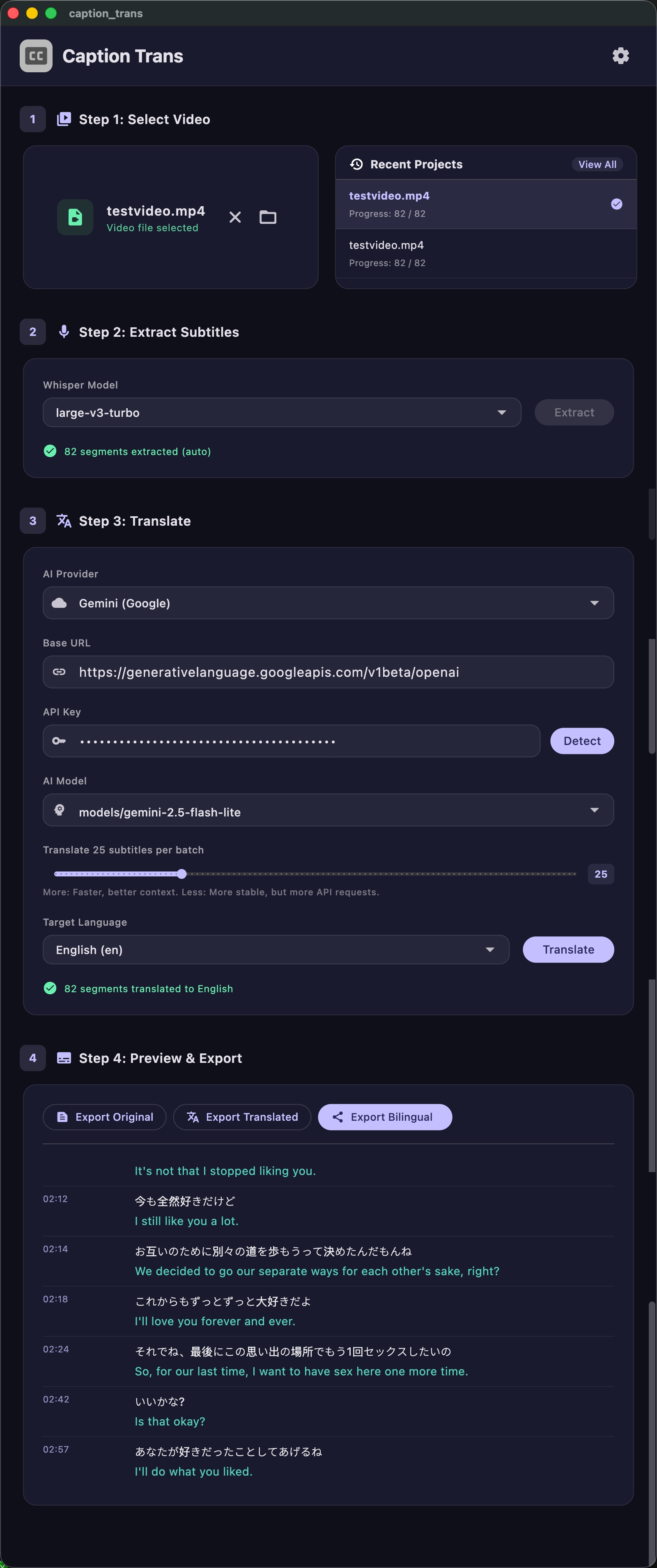
Use AI large language models to translate video subtitles. **Especially optimized for Japanese.**
Supports: Google Gemini, OpenAI, DeepSeek, and other OpenAI-compatible API services.
# Download
Supports macOS (Apple Silicon) and Windows.
Please go to [Releases](https://github.com/cddqssc/Caption-Trans/releases) to download.
## ⚠️ How to open on macOS
1. Double-click the app. Since it is not currently signed with an Apple developer certificate, it will be blocked by the system.
2. Go to **System Settings** > **Privacy & Security**.
3. Scroll down and find the blocked app notice in the Security section, then click **"Open Anyway"**.
4. After verifying your Mac password, click **"Open"** in the final popup.
*(You only need to do this once. After that, you can open it normally by double-clicking.)*
# App Screenshots
 # GPU Acceleration
macOS (Apple Silicon) automatically supports GPU acceleration.
Windows users with NVIDIA graphics cards automatically have GPU acceleration support.
# Notes
Transcription is especially optimized for Japanese, and GPU acceleration is supported on both Windows and macOS.
For translation, I recommend the **gemini flash lite** model. In practice, it is very fast, delivers solid quality, and is relatively affordable. It can also translate some sensitive content.
# License
[MIT License](LICENSE)