
dsh-context
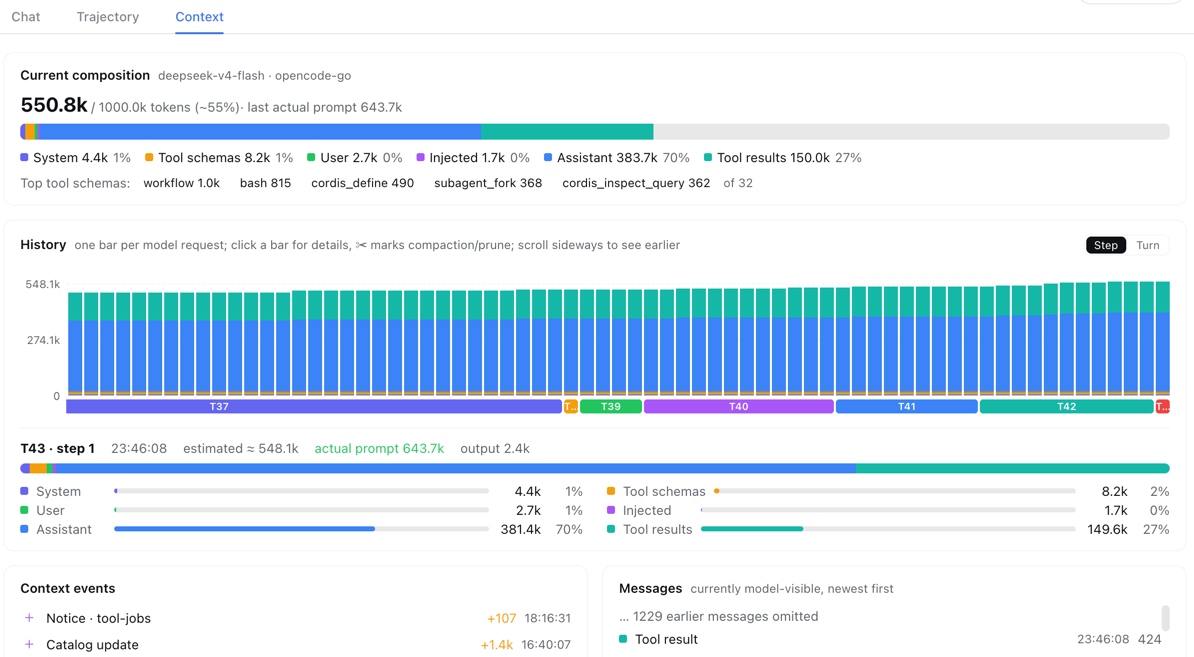
A Context insight panel for DeepSeek Harness (dsh): a plugin that adds a Context tab to the web UI — right beside Chat and Trajectory — so you can see what the model's context window is actually made of, and how it evolves across the conversation.
Quick install
One command, from any DeepSeek Harness installation (the web profile is the one dsh web boots; it is created automatically on first use):
dsh plugin --profile web add dsh-context
then start the web UI and open any session — the 上下文 / Context tab appears right beside Chat and Trajectory:
dsh web
Running dsh from a source checkout instead of the installed CLI? Prefix the commands with
pnpm(pnpm dsh plugin --profile web add dsh-context).
Why
Every model request packs the same window from six sources: the system prompt, tool schemas, your messages, injected context (skills, AGENTS.md, runtime snapshots), assistant replies, and tool results. When a conversation degrades or gets compacted, which part ate the budget is usually invisible. dsh-context makes it observable:
- Current composition — a stacked bar of the six categories, scaled against the model's context window (the gray track is your remaining headroom), plus the top-5 most expensive tool schemas.
- History — one stacked bar per model request (finer than per-turn), with Y-axis ticks and gridlines. Click any bar for its full breakdown, including the provider-reported prompt/output tokens next to the estimate. ✂ marks where compaction/pruning happened — watch the bars drop.
- Context events — compactions, tool-output prunes, skill injections (
Skill injected (code-review)), plugin context injections, model switches — each with its token delta and timestamp. - Messages — the currently model-visible surface, message by message, with per-message token costs.
The UI is bilingual (中文/English) and follows the dsh locale automatically.
Install
dsh-context ships as a dsh bundle: an npm package with a dsh.bundle manifest (a cordis.patch.yml layer that inserts the plugin row) and a dsh.client manifest (the web UI half). No build step, no restart — the one-liner above installs it into the web profile (or any other profile you boot with dsh --profile <name>). The dsh-context loader row activates the host half, and the web app picks up the package's ./client bundle and adds the 上下文 / Context tab to every session view.
To install from this checkout instead (for development), from the repo root:
dsh plugin --profile <name> add .
If dsh is run from a source checkout, prefix the commands with pnpm (pnpm dsh plugin ...).
Usage
Open any session and click 上下文 / Context (to the right of Chat and Trajectory). Data refreshes every 2 seconds while the tab is open; switching sessions switches the view to that session's log — including historical, persisted sessions.
- Hover a history bar for a quick tooltip; click it to pin the breakdown below the chart.
- The overview bar is scaled to the model's context window, so ~13% full means ~13% of the window is spoken for.
- Numbers are estimates using the same fixed-density heuristic as dsh's built-in tokenMeter (~4 chars ≈ 1 token), so they match the harness's own stats. Wherever the provider reported real usage, it's shown alongside as "actual".
How it works
- Data source: the session's durable event log. Live sessions are folded straight from the in-memory log (
sessions.get(id).events— no clone, no disk parse); persisted sessions fall back tosessionQuery.readSession. - Transport: host ↔ browser over a generic Connection RPC channel (
/dsh-context,ctx.connection.rpc— the same channel mechanism the api gateway uses). The host half registers asnapshotendpoint; the client half calls it viactx.connection.rpc.call. - Incremental fold: per-session fold state lives in the Host half, so each poll only processes newly appended events — reopening the tab is instant.
- Events decoded:
request/header(system prompt + tool schemas), surface events withsurfaceOp(append/replace — compaction rewrites history in place),compaction/summary|prune,assistant/message.usage(real provider tokens), and messagesourcemetadata (pluginforms,skill-invocation) for injection events. - Architecture:
src/host.tsis a plain ESM Cordis plugin (zero runtime dependencies) loaded by thedsh-contextloader row;src/client.ctsis the browser half, transpiled and wrapped at build time into the web boot's closure-factory bundle (window.__ModuleLoader__.load). The client renders with bareReact.createElement— theme-native via dsh CSS variables, bilingual via the clientlocaleservice. Both halves are TypeScript with strict mode and local (drift-free) service contracts.
Development
The project is a pnpm workspace root (pnpm-workspace.yaml), so pnpm install never walks up into a parent workspace.
pnpm install            # devDependencies only — the plugin itself stays dependency-free
pnpm run typecheck      # tsc --noEmit (strict)
pnpm run build          # esbuild: lib/index.js (host) + lib/client.js (client bundle)
pnpm test               # typecheck + functional tests for both halves
build.mjs also smoke-checks the outputs (both halves must parse; the host half must import with the name/inject/apply plugin shape).
Files
| File | Role |
|---|---|
src/host.ts |
Host half (strict TS): incremental log fold, category accounting, /dsh-context snapshot RPC |
src/client.cts |
Client half (strict TS, CJS-flavored for the browser bundle): tab registration, bilingual chart UI |
tsconfig.json |
Strict typecheck config (noEmit; esbuild does the transpiling) |
package.json |
dsh.bundle (patch layer) + dsh.client (web UI) manifests |
cordis.patch.yml |
The bundle's patch layer: inserts the dsh-context row |
scripts/build.mjs |
esbuild-based build of lib/index.js + lib/client.js |
docs/screenshot.png |
The UI in action |