
243 lines
11 KiB
Markdown
243 lines
11 KiB
Markdown

|
||
|
||
# `yutu`
|
||
|
||
[](https://gitmoji.dev)
|
||
[](https://goreportcard.com/report/github.com/eat-pray-ai/yutu)
|
||
[](https://github.com/eat-pray-ai/yutu?tab=Apache-2.0-1-ov-file)
|
||
[](https://pkg.go.dev/github.com/eat-pray-ai/yutu)
|
||
[](https://raw.githack.com/wiki/eat-pray-ai/yutu/coverage.html)
|
||
|
||
[](https://github.com/eat-pray-ai/yutu/stargazers)
|
||
[](https://github.com/eat-pray-ai/yutu/releases/latest)
|
||
[](https://github.com/eat-pray-ai/yutu/actions/workflows/publish.yml)
|
||
[](https://github.com/eat-pray-ai/yutu/actions/workflows/codeql.yml)
|
||
[](https://github.com/eat-pray-ai/yutu/actions/workflows/test.yml)
|
||
[](https://archestra.ai/mcp-catalog/eat-pray-ai__yutu)
|
||
|
||
[](https://github.com/eat-pray-ai/yutu/releases/latest)
|
||
[](https://formulae.brew.sh/formula/yutu)
|
||
[](https://winstall.app/apps/eat-pray-ai.yutu)
|
||
|
||
[](https://www.producthunt.com/posts/yutu?embed=true&utm_source=badge-featured&utm_medium=badge&utm_souce=badge-yutu)
|
||
|
||
`yutu` is a fully functional MCP server and CLI for YouTube to automate your YouTube workflows. It can manipulate almost all YouTube resources, like videos, playlists, channels, comments, captions, and more. [中文文档](./README_zh.md)
|
||
|
||
[](https://asciinema.org/a/wXIHU4ciFBAKrHfaFNkMoIs12)
|
||
|
||
## Table of Contents
|
||
|
||
- [Prerequisites](#prerequisites)
|
||
- [Installation](#installation)
|
||
- [GitHub Actions](#github-actions)
|
||
- [Docker](#docker)
|
||
- [Gopher](#gopher)
|
||
- [Linux](#linux)
|
||
- [macOS](#macos)
|
||
- [Windows](#windows)
|
||
- [Verifying Installation](#verifying-installation)
|
||
- [MCP Server](#mcp-server)
|
||
- [Usage](#usage)
|
||
- [Features](#features)
|
||
- [Contributing](#contributing)
|
||
|
||
## Prerequisites
|
||
|
||
Before you begin, an account on [Google Cloud Platform](https://console.cloud.google.com/) is required to create a **Project** and enable these APIs for this project, in `APIs & Services -> Enable APIs and services -> + ENABLE APIS AND SERVICES`
|
||
|
||
- [YouTube Data API v3(Required)](https://console.cloud.google.com/apis/api/youtubeanalytics.googleapis.com/overview)
|
||
- [YouTube Analytics API(Optional)](https://console.cloud.google.com/apis/api/youtubeanalytics.googleapis.com/overview)
|
||
- [YouTube Reporting API(Optional)](https://console.cloud.google.com/apis/api/youtubereporting.googleapis.com/overview)
|
||
|
||
After enabling the APIs, create an `OAuth content screen` with yourself as test user, then create an `OAuth Client ID` of type `Web Application` with `http://localhost:8216` as the redirect URI.
|
||
|
||
Download this credential to your local machine with name `client_secret.json`, it should look like
|
||
|
||
```json
|
||
{
|
||
"web": {
|
||
"client_id": "11181119.apps.googleusercontent.com",
|
||
"project_id": "yutu-11181119",
|
||
"auth_uri": "https://accounts.google.com/o/oauth2/auth",
|
||
"token_uri": "https://oauth2.googleapis.com/token",
|
||
"auth_provider_x509_cert_url": "https://www.googleapis.com/oauth2/v1/certs",
|
||
"client_secret": "XXXXXXXXXXXXXXXX",
|
||
"redirect_uris": [
|
||
"http://localhost:8216"
|
||
]
|
||
}
|
||
}
|
||
```
|
||
|
||
To verify this credential, run the following command
|
||
|
||
```shell
|
||
❯ yutu auth --credential client_secret.json
|
||
```
|
||
|
||
A browser window will open asking for your permission to access your YouTube account, after granting the permission, a token will be generated and saved to `youtube.token.json`.
|
||
|
||
```json
|
||
{
|
||
"access_token": "ya29.XXXXXXXXX",
|
||
"token_type":"Bearer",
|
||
"refresh_token":"1//XXXXXXXXXX",
|
||
"expiry":"2024-05-26T18:49:56.1911165+08:00"
|
||
}
|
||
```
|
||
|
||
By default, `yutu` will read `client_secret.json` and `youtube.token.json` from the current directory, `--credential/-c` and `--cacheToken/-t` flags are available only in `auth` subcommand. To modify the default path in all subcommands, set these environment variables
|
||
|
||
```shell
|
||
❯ export YUTU_CREDENTIAL=client_secret.json
|
||
❯ export YUTU_CACHE_TOKEN=youtube.token.json
|
||
# or
|
||
❯ YUTU_CREDENTIAL=client_secret.json YUTU_CACHE_TOKEN=youtube.token.json yutu subcommand --flag value
|
||
```
|
||
|
||
## Installation
|
||
|
||
You can download `yutu` from [releases page](https://github.com/eat-pray-ai/yutu/releases/latest) directly, or use the following methods as you prefer.
|
||
|
||
### GitHub Actions
|
||
|
||
There are two actions available for yutu, one is for general purpose and the other is for uploading video to YouTube. Refer to [youtube-action](https://github.com/eat-pray-ai/youtube-action) and [youtube-uploader](https://github.com/eat-pray-ai/youtube-uploader) for more information.
|
||
|
||
### Docker
|
||
|
||
```shell
|
||
❯ docker pull ghcr.io/eat-pray-ai/yutu:latest
|
||
❯ docker run --rm ghcr.io/eat-pray-ai/yutu:latest
|
||
# make sure client_secret.json is in the current directory
|
||
❯ docker run --rm -it -u $(id -u):$(id -g) -v $(pwd):/app -p 8216:8216 ghcr.io/eat-pray-ai/yutu:latest
|
||
```
|
||
|
||
### Gopher
|
||
|
||
```shell
|
||
❯ go install github.com/eat-pray-ai/yutu@latest
|
||
```
|
||
|
||
### Linux
|
||
|
||
```shell
|
||
❯ curl -sSfL https://raw.githubusercontent.com/eat-pray-ai/yutu/main/scripts/install.sh | bash
|
||
```
|
||
|
||
### macOS
|
||
|
||
Install `yutu` using [Homebrew🍺](https://brew.sh/)(recommended), or run the shell script.
|
||
|
||
```shell
|
||
❯ brew install yutu
|
||
|
||
# or
|
||
❯ curl -sSfL https://raw.githubusercontent.com/eat-pray-ai/yutu/main/scripts/install.sh | bash
|
||
```
|
||
|
||
### Windows
|
||
|
||
```shell
|
||
❯ winget install yutu
|
||
```
|
||
|
||
### Verifying Installation
|
||
|
||
Verify the integrity and provenance of `yutu` using its associated cryptographically signed attestations.
|
||
|
||
```shell
|
||
# Docker
|
||
❯ gh attestation verify oci://ghcr.io/eat-pray-ai/yutu:latest --repo eat-pray-ai/yutu
|
||
|
||
# Linux and macOS(if installed using shell script)
|
||
❯ gh attestation verify $(which yutu) --repo eat-pray-ai/yutu
|
||
|
||
# Windows
|
||
❯ gh attestation verify $(where.exe yutu.exe) --repo eat-pray-ai/yutu
|
||
```
|
||
|
||
## MCP Server
|
||
|
||
[](https://insiders.vscode.dev/redirect/mcp/install?name=yutu&config=%7B%22type%22%3A%20%22stdio%22%2C%22command%22%3A%20%22yutu%22%2C%22args%22%3A%20%5B%22mcp%22%5D%2C%22env%22%3A%20%7B%22YUTU_CREDENTIAL%22%3A%20%22%2Fabsolute%2Fpath%2Fto%2Fclient_secret.json%22%2C%22YUTU_CACHE_TOKEN%22%3A%20%22%2Fabsolute%2Fpath%2Fto%2Fyoutube.token.json%22%7D%7D)
|
||
[](https://cursor.com/install-mcp?name=yutu&config=JTdCJTIyY29tbWFuZCUyMiUzQSUyMnl1dHUlMjBtY3AlMjIlMkMlMjJlbnYlMjIlM0ElN0IlMjJZVVRVX0NSRURFTlRJQUwlMjIlM0ElMjIlMkZhYnNvbHV0ZSUyRnBhdGglMkZ0byUyRmNsaWVudF9zZWNyZXQuanNvbiUyMiUyQyUyMllVVFVfQ0FDSEVfVE9LRU4lMjIlM0ElMjIlMkZhYnNvbHV0ZSUyRnBhdGglMkZ0byUyRnlvdXR1YmUudG9rZW4uanNvbiUyMiU3RCU3RA%3D%3D)
|
||
|
||
As a [MCP server](https://modelcontextprotocol.io/introduction), `yutu` can be used in MCP clients like [Claude Desktop](https://modelcontextprotocol.io/quickstart/user), [VS Code](https://code.visualstudio.com/) or [Cursor](https://docs.cursor.com/), which allows you to interact with YouTube resources in a chat-like interface.
|
||
|
||
Before using `yutu` as an MCP server, make sure `yutu` is installed(see [Installation](#installation) section), and you have a valid `client_secret.json` and `youtube.token.json` files(refer to [Prerequisites](#prerequisites) section).
|
||
|
||
You can add `yutu` as a MCP server in VS Code or Cursor by clicking corresponding badge above, or add the following configuration manually to your MCP client. Remember to replace the values of `YUTU_CREDENTIAL` and `YUTU_CACHE_TOKEN` with correct paths on your local machine.
|
||
|
||
```json
|
||
{
|
||
"yutu": {
|
||
"type": "stdio",
|
||
"command": "yutu",
|
||
"args": [
|
||
"mcp"
|
||
],
|
||
"env": {
|
||
"YUTU_CREDENTIAL": "/absolute/path/to/client_secret.json",
|
||
"YUTU_CACHE_TOKEN": "/absolute/path/to/youtube.token.json"
|
||
}
|
||
}
|
||
}
|
||
```
|
||
|
||
## Usage
|
||
|
||
```shell
|
||
❯ yutu
|
||
yutu is a fully functional MCP server and CLI for YouTube, which can manipulate almost all YouTube resources
|
||
|
||
Usage:
|
||
yutu [flags]
|
||
yutu [command]
|
||
|
||
Available Commands:
|
||
activity List YouTube activities
|
||
auth Authenticate with YouTube API
|
||
caption Manipulate YouTube captions
|
||
channel Manipulate YouTube channels
|
||
channelBanner Insert Youtube channel banner
|
||
channelSection Manipulate YouTube channel sections
|
||
comment Manipulate YouTube comments
|
||
commentThread Manipulate YouTube comment threads
|
||
completion Generate the autocompletion script for the specified shell
|
||
help Help about any command
|
||
i18nLanguage List YouTube i18n languages
|
||
i18nRegion List YouTube i18n regions
|
||
mcp Start MCP server
|
||
member List channel's members' info
|
||
membershipsLevel List memberships levels' info
|
||
playlist Manipulate YouTube playlists
|
||
playlistImage Manipulate YouTube playlist images
|
||
playlistItem Manipulate YouTube playlist items
|
||
search Search for YouTube resources
|
||
subscription Manipulate YouTube subscriptions
|
||
superChatEvent List Super Chat events for a channel
|
||
thumbnail Set thumbnail for a video
|
||
version Show the version of yutu
|
||
video Manipulate YouTube videos
|
||
videoAbuseReportReason List YouTube video abuse report reasons
|
||
videoCategory List YouTube video categories
|
||
watermark Manipulate YouTube watermarks
|
||
|
||
Flags:
|
||
-h, --help help for yutu
|
||
|
||
Use "yutu [command] --help" for more information about a command.
|
||
```
|
||
|
||
## Features
|
||
|
||
Please refer to [FEATURES.md](docs/FEATURES.md) for more information.
|
||
|
||
## Contributing
|
||
|
||
Please refer to [CONTRIBUTING.md](docs/CONTRIBUTING.md) for more information.
|
||
|
||
## Star History
|
||
|
||
[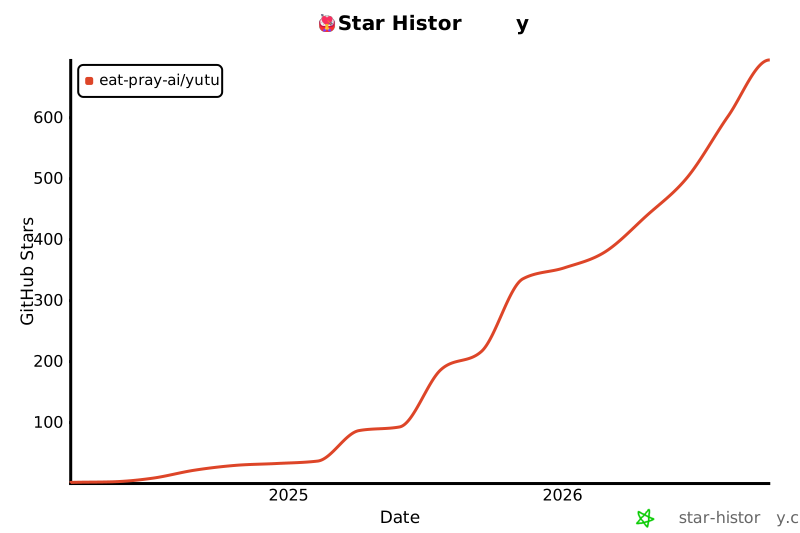](https://star-history.com/#eat-pray-ai/yutu&Date)
|